
Version Comparison: Revit 2018 to Revit 2024

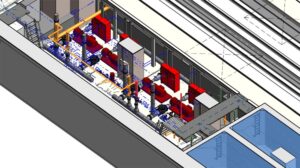
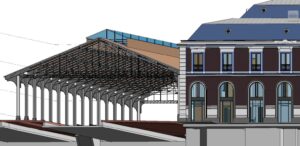
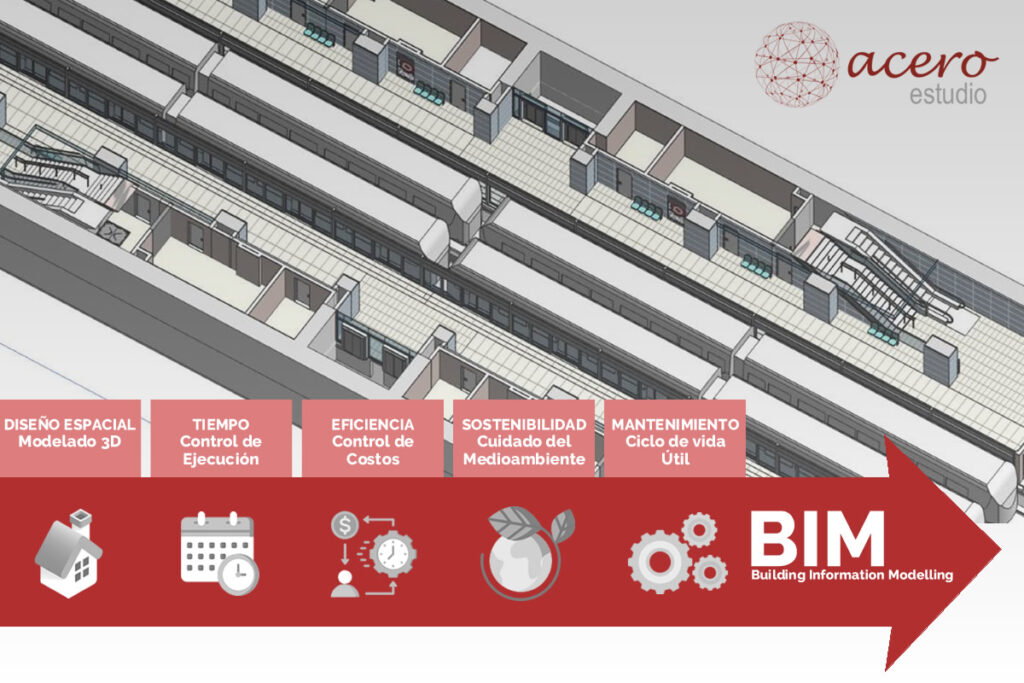
modelo bim del metro de riyad elaborado por los consultores bim de acero estudio

In the past five years, BIM has continued its significant progress, driving widespread adoption of platforms like Autodesk Revit, which enables architecture, engineering, and construction (AEC) teams to collaborate in real time and efficiently manage all stages of a project.

Revit, Autodesk’s leading software for BIM modeling, has continuously integrated improvements in its versions from 2018 to 2024, expanding its capabilities for increasingly sophisticated collaboration, precision, and visualization.

Key Improvements in Revit Versions 2018 to 2024

  • Revit 2018: Enhancements in editing complex walls, 3D reinforcement, and new graphic filters.
  • Revit 2019: Support for perspective views and a new rendering engine.
  • Revit 2020: Introduction of the “Path of Travel” tool and improvements in MEP systems analysis.
  • Revit 2021: New cloud collaboration tools and advanced view customization.
  • Revit 2022: Improved parametric modeling and advanced phase control tools.
  • Revit 2023: Enhanced interoperability and compatibility with Enscape for visualization.
  • Revit 2024: Optimization of collaborative BIM workflows and improved review tools.

New Feature Details

  • Revit 2018:
    This version introduced important optimizations for editing complex walls, allowing users to make structural modifications quickly and precisely. It also added a 3D reinforcement feature, aiding projects that require precision in reinforced concrete structures. Additionally, Revit 2018’s graphic filters improved visual clarity and project view customization.
    revit 2018
  • Revit 2019:
    In 2019, Autodesk improved the visual interface and support for perspective views, providing designers with a smoother navigation experience within models. The new rendering engine also allowed users to achieve higher-quality renders without impacting overall software performance.
    revit 2019
  • Revit 2020:
    A standout feature in this version was the “Path of Travel” tool, which automatically calculates routes within the model, useful for evacuation design and space optimization. Improvements in MEP (Mechanical, Electrical, Plumbing) systems analysis also made working on complex systems easier by enhancing interference detection and load calculation accuracy.
  • Revit 2021:
    Revit 2021 featured essential cloud collaboration tools for projects with remote teams. Advanced view customization provided greater control over model visualization, enabling users to adapt their workspace to the specific needs of each user or project.
  • Revit 2022:
    This version enhanced parametric modeling, increasing flexibility in designing architectural elements. Phase control tools made project planning and management easier, allowing teams to accurately manage the different stages of a construction project.
  • Revit 2023:
    With a strong focus on interoperability, Revit 2023 included significant improvements in compatibility with Enscape, facilitating the creation of high-quality, realistic visualizations directly from the BIM model. This integration was particularly useful for architects and engineers looking to review and share their projects in an attractive and easily interpretable visual format.
    revit 2023
  • Revit 2024: The latest version optimized collaborative BIM workflows, enabling faster and more efficient synchronization among teams. Enhanced review and markup tools facilitate feedback and change tracking, which are essential during the development and construction phases. These updates make Revit 2024 an even more powerful tool for managing complex collaborative projects.

If you’re interested in implementing a BIM solution in your company, project, or even for building management, don’t hesitate to contact Acero Estudio. We specialize in BIM consulting and have a team of experts in Revit.

Let’s talk, find points of support, and consolidate your ideas. We’re at your service.

Is Real-Time Updating of BIM Models Advantageous?

importancia del tiempo real en bim

The BIM methodology offers a significant advantage by enabling real-time functionality. This means that any modifications made to the BIM model are automatically updated in all related documents and plans.

This technical feature is far more than just a technicality; it ensures that all project participants are always working with the most current information, thus eliminating the risk of errors due to lack of synchronization and the need for manual updates across multiple files.

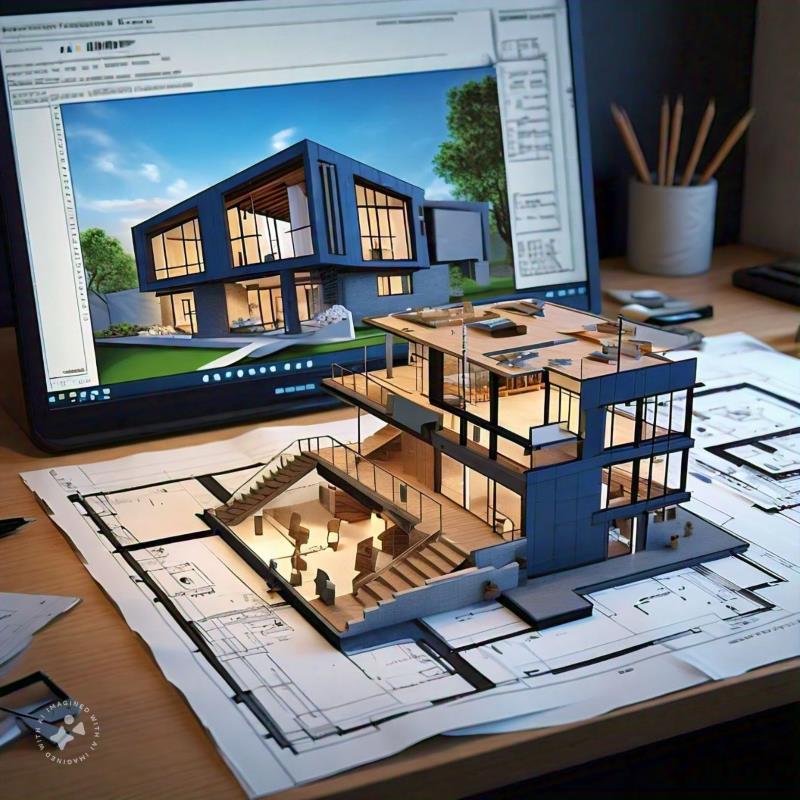
bim modeling

Benefits of Real-Time Functionality in BIM

  • Error Reduction: With data being updated instantly, errors and duplications are minimized since all professionals access the same updated model, avoiding work on outdated documents or older versions.
  • Avoidance of Work Duplication: Architecture, engineering, and construction teams can collaborate on a single model reflecting the project’s current state. This streamlines communication and decision-making, as all team members view changes in real time.
  • Resource Optimization: Automated updates eliminate the need for manual review and modification of multiple documents. This saves time, reduces resource use, and allows teams to focus on value-added tasks.
  • Quality Control and Monitoring: Real-time information facilitates ongoing project progress tracking and enables early detection of potential issues or discrepancies in design and construction.
  • Greater Transparency for Clients: Clients and other stakeholders can review the updated model in real time, providing a clear, detailed view of the project status, thus enhancing transparency and trust in the construction process.

In summary, real-time updating in BIM not only optimizes workflow and information accuracy but also transforms the way construction projects are managed. By ensuring that all parties involved work with the latest information, BIM methodology enables effective coordination and more efficient and reliable project execution.

If you’re ready to implement BIM through software such as Revit or others, don’t hesitate to contact us for information on our BIM consulting services. Remember that at Acero Estudio, we are BIM specialists at your service.

Avoid errors and improve project planning. We’re here to help you.

Is BIM Suitable for Infrastructure Construction?

consultoria bim para proyectos de infraestructura

When it comes to infrastructure, BIM’s uses are significant. BIM is applicable in planning and managing complex projects such as bridges, roads, drainage systems, and railway tracks, among others. It also enables the creation of precise digital models that integrate all phases of the project.

Risk Reduction, the Top Priority

Infrastructure projects involve extensive investments, whether carried out by national or local governments or private entities. The sums invested in these types of projects are substantial, and there is always a strong emphasis on avoiding construction risks that could lead to rework or unforeseen problems. With BIM modeling, even before laying a single brick, a crucial step in risk prevention can be achieved. This collaborative system allows the entire construction team to analyze, enhance, and identify potential risks. Moreover, thanks to its ability to generate real-time simulations and analyses, BIM facilitates informed decision-making, leading to greater sustainability and durability of infrastructure.

Improving Efficiency and Project Scheduling

While BIM is often considered solely a tool for risk reduction, it also enhances project efficiency by helping forecast material costs with minimal waste and ensuring proper construction timelines. However, the model requires the right input, and this is where Acero Estudio’s BIM consulting services stand out. A poorly executed or incomplete model can be detrimental to your project. Contact us and let us help you—our team of specialists is ready to provide support and guidance whenever you need it.

BIM vs CAD: What Are the Differences and Which Is Better for Your Project?

Similitudes y diferencias entre BIM y CAD

In the world of construction and design, two tools have dominated over the past few decades: CAD (Computer-Aided Design) and BIM (Building Information Modeling). While both are designed to facilitate the creation of technical plans and designs, they have notable differences in terms of focus and functionality.

What is CAD (Computer-Aided Design)?

CAD, or Computer-Aided Design, is a tool that allows designers and architects to create graphical representations of objects in 2D and 3D. It originated as an evolution of hand-drawn designs and has been widely adopted in industries such as architecture, engineering, and manufacturing. The primary goal of CAD is to provide a precise and efficient way to create geometric designs.

What is BIM (Building Information Modeling)?

On the other hand, BIM, or Building Information Modeling, goes beyond graphic design and offers a more comprehensive approach to construction projects. BIM not only focuses on geometric aspects but also incorporates relevant information about materials, costs, timelines, maintenance, and the project’s lifecycle. BIM enables a collaborative environment where all disciplines involved in the project can contribute to a single, coordinated model.

Technical Differences Between BIM and CAD

Below is a comparative table that details the main differences between CAD and BIM in terms of technical characteristics, software, uses, and benefits:

Features CAD (Computer-Aided Design) BIM (Building Information Modeling)
Main Focus Creation of 2D drawings and 3D models Comprehensive project management, including design, data, and building lifecycle
Graphical Representation Geometric models, basic lines and shapes Parametric 3D models with associated information (materials, costs, timelines, etc.)
Collaboration Limited, typically individual file-based work Real-time collaboration between multiple disciplines in a single model
Common Software AutoCAD, MicroStation, SolidWorks, CATIA Revit, ArchiCAD, Navisworks, Tekla, Bentley BIM
Precision and Detail Geometric precision; highly accurate representations Enhanced detail and precision with material data and specific functionalities
Data Management Limited to visual representation Management and analysis of complex project data (materials, costs, etc.)
Project Phases Design and documentation Design, construction, maintenance, management, and operation
3D Modeling Basic, focused on geometry Intelligent modeling with integrated data
Main Usage Architecture, mechanical engineering, industrial design Architecture, engineering, construction, and infrastructure operation
Simulation and Analysis Limited; geometric simulations Advanced structural analysis, energy performance, timeline simulations
Compatibility May require manual conversions or integration between systems Natively integrable with other analysis and planning software
Implementation Cost Generally more economical and easier to implement Higher initial cost but long-term savings due to lifecycle efficiency
Execution Time Fast design but slower for complex projects Initially slower due to model complexity, but optimizes overall project execution
Industry Usage Mechanical engineering, manufacturing, product design, architecture Architecture, civil engineering, construction, infrastructure maintenance

Conclusion

Both technologies provide an appropriate visual approach to construction projects, with each one suited for specific uses. CAD is ideal for projects requiring precise geometric design, while BIM is better suited for larger, more complex projects that involve multiple disciplines and require comprehensive lifecycle management.

If you want to learn more about CAD, we offer CAD design services. On the other hand, if you need BIM consulting or BIM modeling for your projects, don’t hesitate to contact us. At Acero Estudio, we specialize in providing services for the construction and engineering sectors. We’re here to help!

Differences Between Topographic Levels and Types of Leveling

realizando un levantamiento topografico

Among our clients, we’ve noticed an interest in clarifying the differences between topographic levels (tools) and leveling methodologies (procedures).

Types of Topographic Levels

In the field of topography, using different types of levels is essential for ensuring accuracy in height and distance measurements. Each type of level has its own purpose and characteristics, and its selection depends on the specific needs of the project.

Plane Levels
Plane levels, also known as optical levels, are primarily used to measure the horizontality of a terrain. This type of level requires the operator to manually adjust the instrument to make it horizontal before taking readings. They are ideal for simple leveling projects where it’s necessary to ensure that a surface is level in relation to a horizontal plane. They are widely used in construction and landscaping projects where ensuring the land or structural elements are perfectly level is necessary.

Line Levels
Line levels are more precise instruments that project a horizontal line on the ground, facilitating the alignment of structures across a surface. Unlike plane levels, they don’t require constant adjustments, making them faster and more efficient in repetitive alignment tasks. They are used in infrastructure projects, such as the installation of pipes or the alignment of pillars, where precision in height and alignment is crucial.

Automatic Levels
Automatic levels, also known as self-leveling levels, are the most advanced. They use a compensator that automatically adjusts the instrument to achieve perfect horizontality, eliminating human errors. They are extremely precise and are used in large-scale projects where accuracy is vital. This type of level is very common in civil engineering projects, road construction, and high-precision topographic surveys.

Types of Leveling

Leveling, the process by which the height difference between points on the ground is determined, can be carried out in various ways.

Trigonometric Leveling
Trigonometric leveling is based on trigonometric calculations using angles of elevation or depression and horizontal distances to determine the height of one point relative to another. This method is useful in rugged terrain or when the distances between points are long. It is employed in projects that require measuring height differences in uneven terrain or mountainous areas.

Height Leveling
Also known as geometric leveling, this is the most common method in topography. It consists of the direct measurement of height differences between several points using instruments like the automatic level. It is the most precise method and is used when high accuracy is required. It’s ideal for building construction, roads, and infrastructure projects that require precise height data.

Barometric Leveling
This type of leveling uses atmospheric pressure to estimate the altitude of different points. While it is less accurate than other methods, it is useful for preliminary studies in large areas. It is used in extensive topographic studies where millimetric precision is not required, such as in geographic explorations or environmental surveys.

Simple Leveling
Simple leveling involves measuring the height difference between two points using a handheld level or basic instrument. It is suitable for small projects where it is necessary to quickly determine the slope of the terrain. It is used in the construction of small lots, post installation, or landscaping projects.

Why Choose Acero Estudio as Your Topography Service Provider?

Acero Estudio is a company specialized in topographic surveys with over 10 years of experience in the industry. We use the most advanced technologies, such as drones for photogrammetry, and apply precise leveling methods to guarantee the accuracy of our work in all types of projects. Our team of experts is ready to offer personalized solutions tailored to each client’s needs.

If you’re looking for a reliable company for your next topographic project, contact Acero Estudio. We are ready to provide you with the best service in topographic surveys and drone topography.

10 Principal Uses of the BIM Methodology

principales usos de la metodologia bim

As we always emphasize on our website, social media, or through our technical teams in meetings with clients, the BIM methodology is here to stay and transform the construction, engineering, and architecture industries.

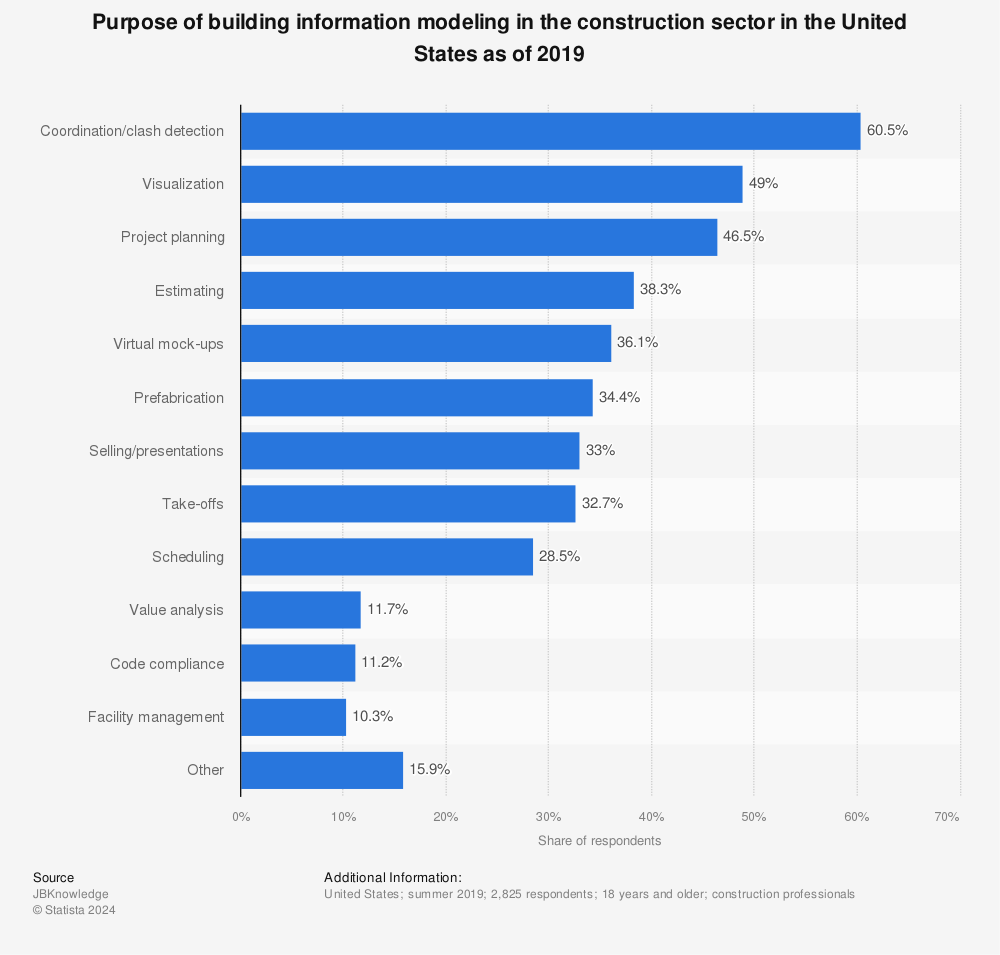
Below, we detail some of the main uses that companies give to this important methodology. The source of this valuable information is Statista, and we will expand on it with additional observations and ideas:

  1. Clash Detection (60.5%)

BIM allows interdisciplinary teams to work in a coordinated manner, detecting conflicts between intersecting areas and identifying design risks. This functionality is crucial for finding interferences between systems, such as crossing pipes, beams, or improperly placed electrical installations. This avoids rework risks and reduces construction costs.

  1. Visualization (49%)

As the saying goes, a picture is worth a thousand words. With BIM, we can achieve an enhanced, precise 3D image enriched with metadata of physical elements. This allows those involved in the construction process to have the proper visualization that helps them better understand the design, communicate ideas to clients, and make informed decisions.

  1. Project Planning (46.5%)

Projects using BIM can implement detailed schedules directly linked to 3D models.

  1. Estimating (38.3%)

38.3% of the people in the study indicate that BIM facilitates and promotes the generation of estimates by allowing quantities and costs to be generated by the model. This results in more accurate budgets as the project evolves.

  1. Virtual Mock-Ups (36.1%)

Prototypes are useful for conducting tests, simulations, and obtaining client approval before proceeding with the physical construction of any project.

  1. Prefabrication of Elements (34.4%)

The manufacturing of columns, steel beams, and other elements greatly benefits from the use of BIM, as the detailed models allow for the fabrication of components off-site with a high degree of precision.

  1. Presentations and Sales (33%)

BIM is a powerful tool for commercial presentations and sales, as it allows companies to showcase previews of any project. This facilitates communication and increases the chances of closing sales.

  1. Take-offs (32.7%)

Measurements and quantity calculations are more precise and faster with BIM software. Teams can extract data from the model, reducing the margin of error and leading to better material estimation calculations, resulting in more efficient use of the project budget.

  1. Scheduling (28%)

BIM links project scheduling with the 3D model, allowing teams to better manage time and work sequences.

  1. Value Analysis (11.7%)

Although this and other features of BIM are the result of improvements that have been added to various software packages, it is important to consider them for evaluating different design and material options that maximize the project’s value.

The uses highlighted in the BIM methodology help us reveal a clear pattern: process optimization, improved coordination, and error reduction are the core values of this new BIM work paradigm. However, without proper induction to the methodology, it could be counterproductive, so we recommend adequate BIM consulting service.

If you want to learn more about Acero Estudio’s services for the construction sector, don’t hesitate to contact us. We have a group of highly experienced BIM consultants who can guide you in all your projects. Write to us today; we are at your service.

Similarities and Differences between BIM Methodology and Digital Twins

similitudes y diferencias entre bim y gemelo digital

In the field of construction, architecture, and building management, the BIM methodology and Digital Twins are fundamental tools for developing models that promote accurate work, provide a management strategy focused on information, and allow for precision in purchasing, maintenance planning, and information transfer between teams.

Although many professionals consider a BIM model to be the same as a Digital Twin, this is not correct, as both technologies complement each other to improve efficiency. In this brief post, we want to share a table with the similarities and differences between BIM and Digital Twins.

Aspect BIM Methodology Digital Twin
What is it? A BIM model is a 3D digital model that realistically represents the design and construction of a building or infrastructure. It also provides centralized project information, allowing for accurate knowledge of the construction characteristics, promoting efficiency, accuracy, and coordination between areas. The digital twin is a realistic, virtual, and dynamic representation of a physical asset in real-time.
Which phase of the asset is it used in? Mainly in design and construction. However, it has also started to be used in maintenance and property management work. Digital twins are useful for projecting activities such as operation, maintenance, and management of the physical asset.
What is its purpose? Improve coordination, communication, and interoperability between company areas to reduce errors, generate objective coordination strategies, and achieve greater cost efficiency. Digital twins allow us to create simulations to anticipate failures, errors, stress tests, etc.
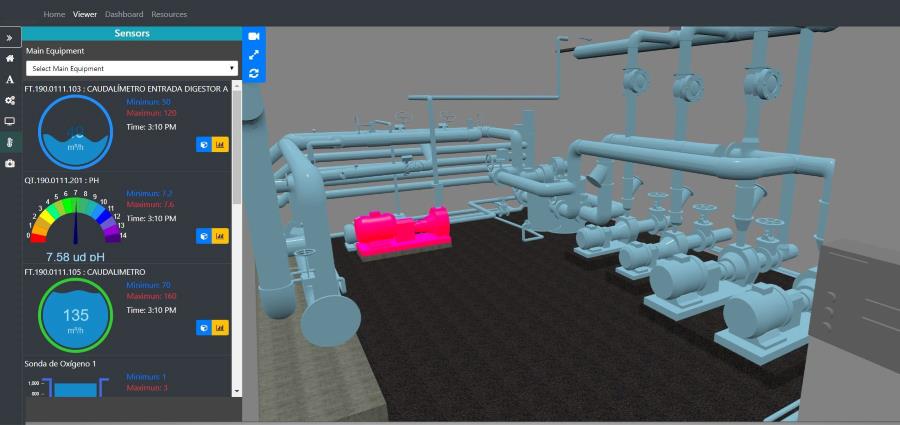
Data update The data is updated in real-time during the construction process. In the Digital Twin, information can be dynamic and continuously updated with real-time data collected from IoT devices.
Simulation properties Allows for the generation of scenarios during design and construction. Allows for real-time simulation and analysis activities based on real asset information.
Interoperability Compatible with various popular software packages for construction professionals. Uses data dynamically integrated from sensors, IoT devices, and other systems.

As you can see in this table, the BIM methodology and Digital Twins are useful but complementary tools that can be used—one adding more value during the development phase of projects and the other in the asset management phase.

If you want to learn more about our digital twin services, BIM consulting, or BIM modeling, do not hesitate to contact us; we are specialists and at your service. Contact us today!

Benefits of Outsourcing BIM Modeling

benefits of bim modeling outsourcing

You are already familiar with the benefits of the BIM methodology and our BIM consulting services for construction and architecture firms. However, if you still believe that these activities should be carried out in-house, this article provides a list of the benefits of outsourcing BIM modeling services due to the flexibility in labor aspects and scalability.

Here are the benefits of outsourcing BIM services:

I. Access to Specialists

By outsourcing BIM services, you gain access to highly experienced and skilled professionals in BIM model development. If your company is just starting to implement the methodology, we recommend not risking your projects in inexperienced hands; contact us to ensure experience and quality.

II. Cost Reduction

While hiring a specialized BIM modeling company may seem expensive at first glance, this is likely because you are not factoring in various costs such as setting up machines for the specialists, purchasing software packages, and hiring specialized personnel. Outsourcing eliminates the need to invest in rapidly depreciating assets and personnel that generate higher fixed costs, in addition to increased administrative requirements and burdens.

III. Greater Flexibility

Outsourcing BIM modeling allows your company to be flexible and adaptable to various types of projects, from smaller to large-scale projects. Adjusting the level of resources according to project demand is a characteristic that can make your company adaptable to market changes.

IV. Focus on Your Business

It is often said that a company should focus on its core business, and this is true. Delegating BIM modeling to specialists allows companies to concentrate on their primary and strategic activities, improving overall efficiency and productivity. Coordination and follow-up with the contracted company are important but require less time and effort, which should be dedicated to further developing the business.

V. Speed of Delivery

Specialist BIM modeling service providers, such as Acero Estudio, have the experience, resources, and qualified personnel to complete projects, even very extensive ones, quickly and within demanding delivery deadlines.

VI. Increased Competitiveness

By improving the quality and efficiency of BIM modeling, companies can offer better services to their clients, increasing their competitiveness in the market.

Contact us an improve your effiency, we are to help you.

Activities and Responsibilities of a BIM Consultant

bim consultant

The BIM methodology is now a requirement and standard in the construction and architecture industry. At Acero Estudio, as specialized BIM consultants, we want to share some ideas that will provide clarity regarding the activities and responsibilities a BIM consultant should undertake. Here are the 8 most important ones:

1. Comprehensive Advice from Installation

BIM operates from the software, so the BIM consultant must provide guidance and support from the software selection, license acquisition, to ensuring relevant ISO standards and vital configurations for each specific client. Incomplete or incorrect advice in this aspect can lead to problems later in the implementation of the model and alignment with industry standards.

2. Designing Implementation Methods for the Methodology

Within companies, there is often fear of change, and groups of people are frequently averse to modifying behaviors. It is the BIM consultant’s job to develop effective strategies for introducing BIM to the organization, considering the company’s culture, people’s knowledge, and achieving an effective transition.

3. Continuous Training

BIM technology and software are constantly evolving, with new features and enhancements regularly being added. Therefore, BIM consultants must continuously stay updated on the latest developments, as problems that arose previously may now have solutions thanks to advancements in the software.

4. Being a Communicator

BIM concepts can be complex at times, which is why a BIM consultant must have strong communication skills to provide security and confidence to their audience. Explaining concepts clearly and persuasively is essential for implementing effective transition strategies.

5. Technical Support

One of the most significant and frequent issues in the use of BIM is the problems users may encounter. It is the BIM consultant’s job to assist in problem-solving, and if immediate solutions are not possible, to proactively seek solutions to avoid delays.

6. Training the Team

Providing adequate training to the team of the company receiving the consultancy is necessary to ensure that this group does not block or sabotage the implementation of the BIM methodology. It is important to develop the methodology in a personalized manner, taking into account the knowledge levels and technological maturity of the people being trained.

7. Follow-up

In the long run, BIM solutions facilitate development work, reduce risks, and enhance team efficiency; however, initially, the shift from traditional construction paradigms can be challenging and may involve a change in philosophy. It is the BIM consultant’s responsibility to conduct follow-ups to identify failures, bottlenecks, or other issues that need to be resolved.

8. Results Management

Finally, it is worth noting that the results of a BIM model are not just images to be stored in memory, but rather living plans that evolve and can continuously provide valuable information for building management. It is important that these model results are managed and turned into maintenance and management plans for the buildings.

Do not hesitate to reach out to Acero Estudio, we are specialized consultants offering services for the construction and architecture industries. Contact us today to inquire about our BIM services, including consultancy and BIM modeling.

Export AutoCAD Drawings to BIM with Precision

beneficios de exportar tu modelo cad a bim

In the engineering and architecture sector, precision is paramount, and the use of CAD and BIM tools is essential. As the professionalization of the industry evolves, the synergy between these technologies deepens, making the integration of Building Information Modeling (BIM) and CAD increasingly crucial.

At Acero Estudio, as specialists in BIM Consulting, we understand how important it is to incorporate your previous AutoCAD drawings into your BIM model. In this document, we provide you with a guide to fully understand the process, ensuring that your transition from AutoCAD to BIM is smooth and effective.

Preparing Your CAD Drawings

Before importing your CAD drawings into any BIM package like Revit, it is important to ensure they are properly prepared. This preparation involves:

Cleaning Up the Graphics

This involves providing the BIM software with precise information. It is advisable to remove unnecessary layers, blocks, and annotations to simplify the drawing. This process reduces complexity and minimizes errors during the export process.

Verifying Scales

Ensure that the scales and units within the CAD software match those in the BIM package. This standardization is important to maintain consistency in units and accurate dimensioning.

Layer Management

The organization of layers in CAD is very useful. Software like Revit can identify layers from programs like AutoCAD. Organizing your layers effectively in AutoCAD will aid in the transition and management of elements within Revit.

Importing AutoCAD Drawings into Revit

In this section, we provide details that can be useful for those who wish to import AutoCAD drawings into Revit. It is important to carefully follow each step in this process:

Import Process

In Revit, navigate to the “Insert” tab and select “Import CAD.” Browse to the location of your AutoCAD file and select it for import.

Choosing Import Options

There are options that you need to configure correctly to ensure the integrity of the imported data. The key configurations are:

  • Define the View: Specify whether the import will be visible only in the current view or throughout the project.
  • Positioning: Choose the appropriate positioning method, such as Auto – Center to Center, Manual – Origin, or Manual – Base Point.
  • Layers/Levels: Specify which layers or levels to import.

Adjusting Visibility Settings

After the import is complete, adjust the visibility and graphics settings in Revit to control the display of the imported drawing.

Ensuring Accuracy and Precision

To maintain the highest level of accuracy and precision during the import process, consider the following practices:

  • Verify the geometry for any discrepancies or errors in the drawing.
  • Align the imported drawing with existing elements in the BIM software. It is advisable to pin it in place to prevent accidental movement.
  • Audit the imported data for inconsistencies.

Benefits of Importing CAD Drawings into BIM

Integrating CAD drawings into BIM offers numerous benefits, including:

  • Better Coordination and Information Sharing: Improved collaboration among team members.
  • Reduced Risks from Miscommunication: Enhanced clarity and understanding.
  • Improved Project Visualization: BIM software allows for better visualization and interpretation of designs.
  • Centralized Design in a Single BIM Model: This integration facilitates better project management and documentation.

Now that you know more about our services, we invite you to contact us. At Acero Estudio, we provide CAD outsourcing services as well as BIM modeling, with BIM consulting being our specialty.

Don’t learn by risking your projects; contact us, and our specialist BIM consultants will guide you through the entire BIM implementation process for your construction developments.